Co-located TanStack Router, TanStack Query, and Shadcn Sidebar in Astro

Integrate TanStack Router, TanStack Query, and a Shadcn sidebar into an Astro app with a co-located routing structure.
This post contains affiliate links for tools I use in production. If you buy through them I earn a commission at no extra cost to you. Recommendations are based on my own experience.
Table of Contents
- Introduction
- Integrating TanStack Router
- Setting Up TanStack Query
- Adding Shadcn Sidebar for Navigation
- Conclusion
- References
Introduction
This guide covers integrating TanStack Router, TanStack Query, and Shadcn’s sidebar component into an Astro application. Versions current as of this update:
{ "astro": "^7.3.3", "@tanstack/react-query": "^5.103.2", "@tanstack/react-router": "^1.170.38"}Tools used:
- Astro: a content-focused framework that ships zero JS by default and hydrates islands on demand.
- TanStack Router: a type-safe router that lets you co-locate route definitions with components.
- TanStack Query: async state management with caching, retries, and background refetching.
- Shadcn Sidebar: a composable, unstyled sidebar primitive you own the source of.
Integrating TanStack Router
TanStack Router supports a co-located routing approach: route files live next to the components they render. This keeps related code together instead of splitting it across a routes directory and a components directory.
Installation
pnpm add @tanstack/react-router @tanstack/router-plugin@tanstack/router-plugin replaces the older @tanstack/router-vite-plugin package name. If you have the old package installed, remove it and install the renamed one.
Configuration
To produce a URL like https://example.com/dashboard, mirror the route in both TanStack Router’s route tree and Astro’s page directory:
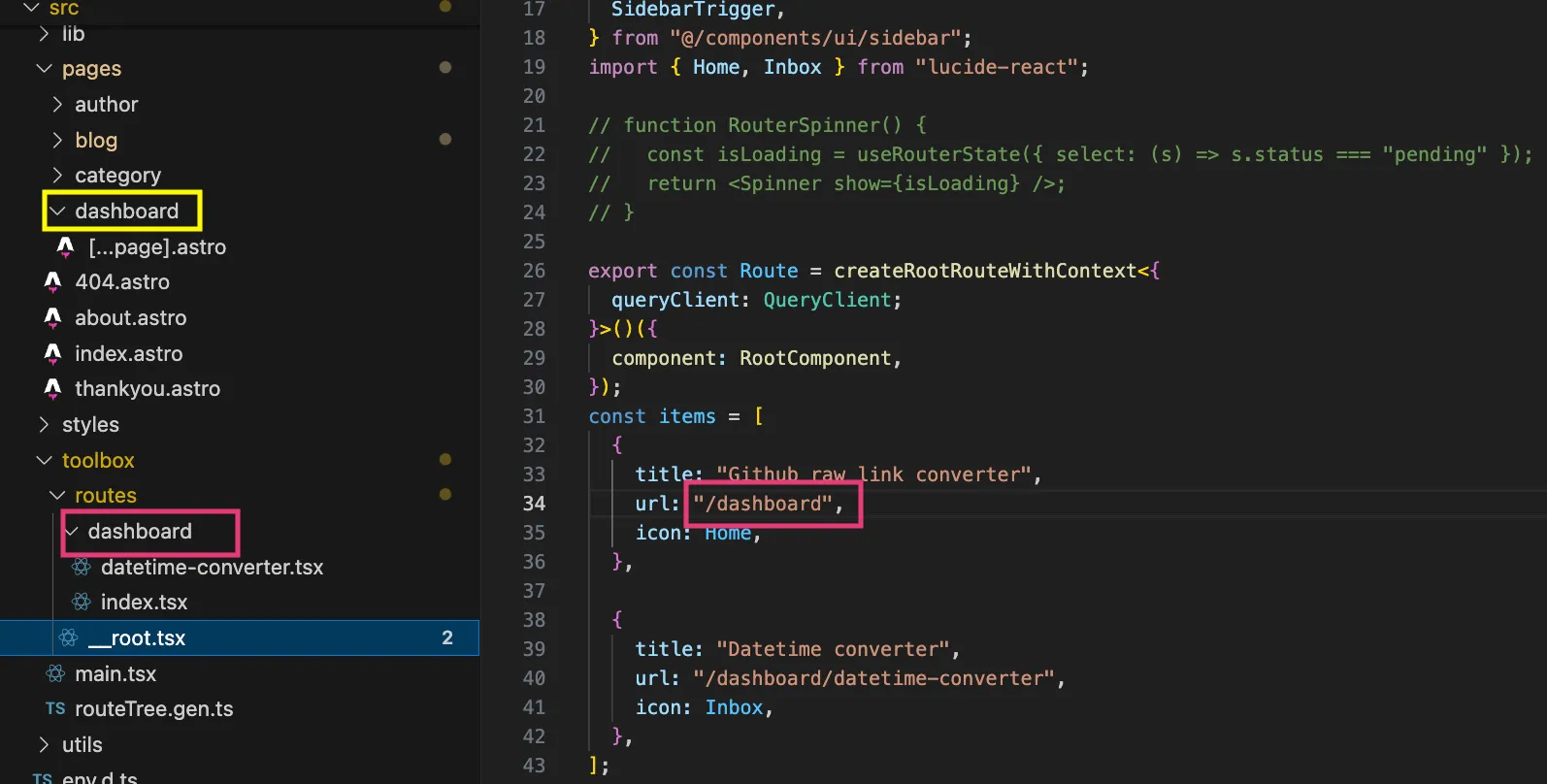
Key points:
-
The TanStack Router side (the route file name, e.g.
dashboard.tsx) drives what path segment the router matches at runtime. -
The Astro side (the page folder, e.g.
src/pages/dashboard/) drives what shows in the browser’s address bar. Keep the folder name consistent with the route so deep links resolve correctly. -
Wire the router plugin into
astro.config.mjs:Click to expand the code
astro.config.mjs // @ts-checkimport { defineConfig } from "astro/config";import remarkMath from "remark-math";import rehypeKatex from "rehype-katex";import partytown from "@astrojs/partytown";import react from "@astrojs/react";import { tanstackRouter } from "@tanstack/router-plugin/vite";import mdx from "@astrojs/mdx";import icon from "astro-icon";import sitemap from "@astrojs/sitemap";// https://astro.build/configexport default defineConfig({integrations: [react(),mdx(),partytown({// Forwards dataLayer.push calls from the main thread to the worker.config: {forward: ["dataLayer.push"],},}),icon(),sitemap(),],vite: {plugins: [tanstackRouter({target: "react",routesDirectory: "./src/toolbox/routes",generatedRouteTree: "./src/toolbox/routeTree.gen.ts",routeFileIgnorePrefix: "-",quoteStyle: "double",}),],},});Tailwind 4 no longer uses
@astrojs/tailwindor atailwind.config.js. It integrates through the@tailwindcss/viteVite plugin and a@import "tailwindcss";line in your global CSS. If you followed the old Tailwind 3 setup, migrate that separately before wiring up the router.
Setting Up TanStack Query
Click to expand the example code
import { QueryClient, QueryClientProvider } from "@tanstack/react-query";import { ErrorComponent, RouterProvider, createRouter,} from "@tanstack/react-router";
import { routeTree } from "./routeTree.gen";import { Spinner } from "@/components/Spinner";
// Initialize QueryClient with default optionsconst queryClient = new QueryClient({ defaultOptions: { queries: { retry: 5, // Number of retry attempts retryDelay: (attemptIndex) => Math.min(1000 * 2 ** attemptIndex, 30000), // Exponential backoff: 1s, 2s, 4s, etc. refetchOnWindowFocus: false, // Optional: disable refetch on window focus }, },});
// Create a new router instanceconst router = createRouter({ routeTree, defaultPendingComponent: () => ( <div className="p-2 text-2xl"> <Spinner /> </div> ), defaultErrorComponent: ({ error }) => <ErrorComponent error={error} />, context: { queryClient, }, defaultPreload: "intent", defaultPreloadStaleTime: 0,});
// Extend TanStack Router's context to include our routerdeclare module "@tanstack/react-router" { interface Register { router: typeof router; }}
export const Dashboard = () => ( <QueryClientProvider client={queryClient}> <RouterProvider router={router} defaultPreload="intent" /> </QueryClientProvider>);Adding Shadcn Sidebar for Navigation
Shadcn’s sidebar component gives you an accessible, composable navigation shell that you copy into your own codebase, so it slots into an Astro island without extra wrapper work.
Installation
pnpm dlx shadcn@latest add sidebarConfiguration
The VariantProps export from class-variance-authority is type-only. Astro’s Vite pipeline will fail the build if you import it as a value:
import { type VariantProps, cva } from "class-variance-authority";// Rest of your sidebar component code...Common error if the type keyword is missing:
[ERROR] [vite] The requested module 'class-variance-authority' does not provide an export named 'VariantProps' Stack trace: at node_modules/.pnpm/vite@.../node_modules/vite/dist/node/chunks/dep-*.js [...] See full stack trace in the browser, or rerun with --verbose.Debugging this in production
This class of error only shows up once, at build or first hydration, and the browser stack trace points into Vite’s internals rather than your code. In production, a hydration mismatch like this manifests as a blank sidebar with no console access to the user’s session. A session replay and error tracker such as LogRocket or Sentry shows the exact sequence of actions and the state at the moment it broke, and both have a free tier that covers a side project.
Conclusion
This setup pairs Astro’s zero-JS-by-default pages with a fully client-routed toolbox section, giving visitors instant page loads everywhere except the interactive parts of the site. TanStack Router, TanStack Query, and Shadcn’s sidebar work well together because none of them fight Astro’s island model: they mount once inside a single React root and manage their own state from there.
If you are taking this into production, the next steps below cover auth, data and observability, and the newsletter is where the Astro SaaS boilerplate ships first.
References
Next steps: scaling to production
If you take this into production, these are the pieces I would add first.
- Clerk Clerk provides drop-in authentication and user management components. Hosted auth saves the login, session and org code you would otherwise maintain.
- Supabase Supabase is a hosted Postgres platform with authentication and storage built in. Postgres with row-level security, so the data layer is ready for multi-tenant apps.
- Sentry Sentry captures errors and performance traces from production applications. Errors and slow transactions from real users, with source maps, before customers report them.
Production-ready Astro + TanStack architecture
Get the architecture cheat sheet and join the waitlist for the Astro SaaS boilerplate.